

Example: 5 nodes Installation#
This example involves the presence of a single tenant and is suitable for small infrastructure up to thousands of accounts, with complete set of Carbonio functionalities.
The Components installed on the 5 Nodes are:
Node 1: Mesh & Directory, Database, and Monitoring
Node 2: MTA AV/AS and Proxy
Node 3: Mailstore & Provisioning, and Tasks
Node 4: Chats, Files, Docs & Editor, and Preview
Node 5: Video Server & Video Recording
Architecture#
The architecture of this scenario is depicted in the following diagram.
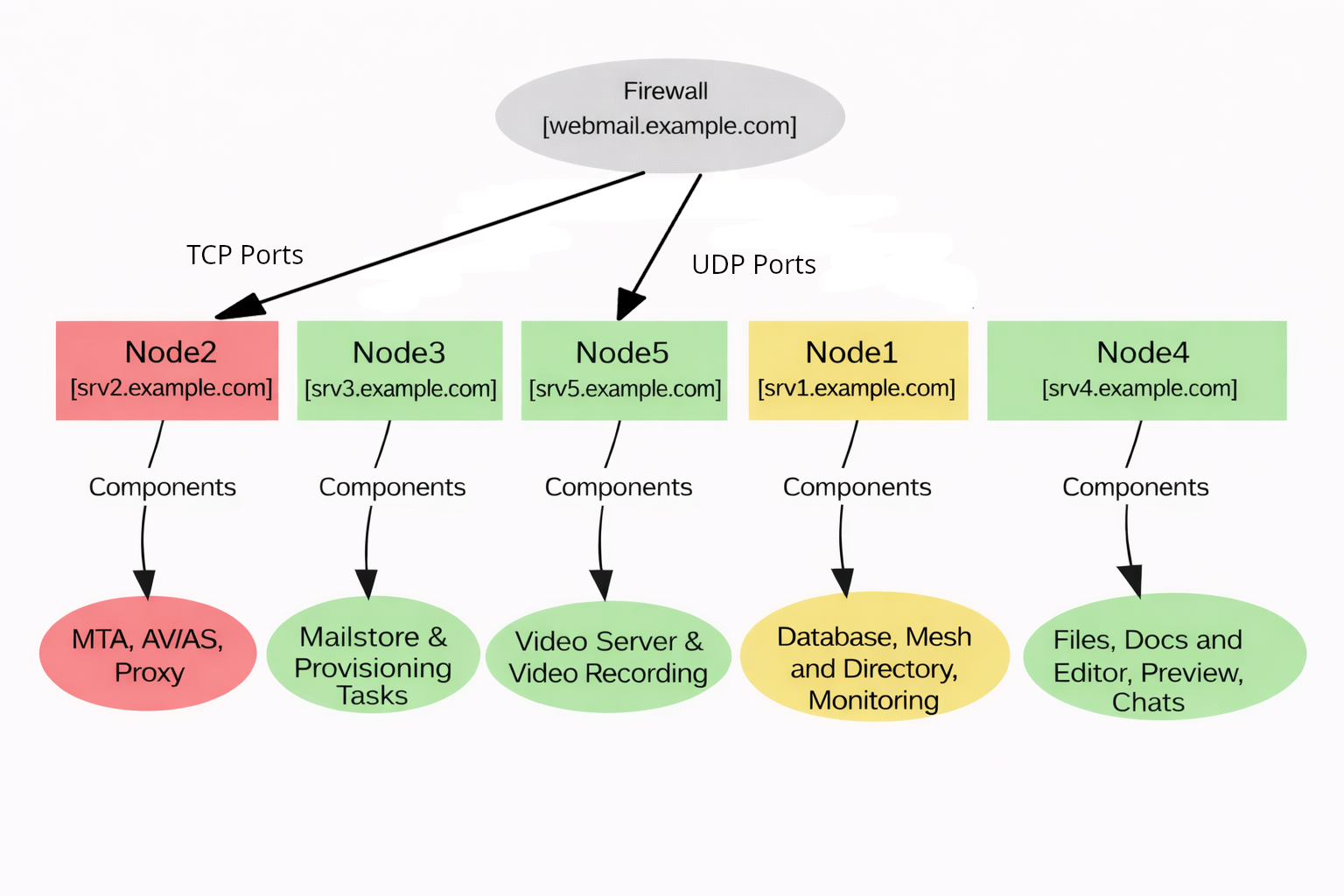
Fig. 4 Sample diagram of a 5 nodes Installation.#
Network Configuration#
The following ports must be opened on the external network, i.e., they are required for proper access to Carbonio from the Internet.
Public hostname |
Ports & Service |
Mapping |
|---|---|---|
mail.example.com |
|
srv2.example.com |
mail.example.com |
|
srv5.example.com |
Ansible Playbook#
This 5 Nodes scenario can be installed using Ansible: you need to
setup a control node to run Ansible playbooks (please refer to section
Prepare the Ansible Environment, then follow the directions on setting up
the control node). To access the control node, execute the following
command to log in (replace mail.example.com with the name or IP of
the control node)
$ ssh root@mail.example.com
$ ssh -A root@mail.example.com
After you have logged in to the control node, download the Ansible inventory (see below this paragraph), replace the FQDN and values present in the file according to your planned Carbonio infrastructure.
Before installing, make sure each Node satisfies the Carbonio Requirements and you have carried out all Preliminaries tasks.
Inventory - “Full Small” Scenario
[postgresServers]
srv1.example.com

[masterDirectoryServers]
srv1.example.com

#Custom Default Domain (Optional)
[masterDirectoryServers:vars]
#default_domain=domain.com

[replicaDirectoryServers]

[serviceDiscoverServers]
srv1.example.com

[dbsConnectorServers]
#must be empty

[mtaServers]
srv2.example.com

[proxyServers]
srv2.example.com

#Specify the public hostname for the webmail like webmail.example.com
[proxyServers:vars]
#webmailHostname=webmailPublicHostname

[applicationServers]
srv3.example.com

[filesServers]
srv4.example.com

[docsServers]
srv4.example.com

[taskServers]
srv3.example.com

[previewServers]
srv4.example.com

#Specify the hostname and public IP address for every server
[videoServers]
#hostname public_ip_address=x.y.z.t
srv5.example.com public_ip_address=8.9.10.11

[workStreamServers]
srv4.example.com

[prometheusServers]
srv1.example.com

[syslogServer]
srv1.example.com
Once you edited the inventory, save it in a directory of your choice
as carbonio-inventory. Now, you can run the script:
from that directory execute the command
$ ansible-playbook zxbot.carbonio_install.carbonio_install \
-u root -i carbonio-inventory