

Subscriptions#
An informative page, containing the current status of the license and additional data about the registration status, including license token, the name of the company registering Carbonio, the start and end date of validity, and the number of accounts (created and available)
Each of the available Components and their features are shown in the page, including the number of accounts licenced. Components for which no license has been purchased are hidden from the view.
If the system is not yet registered, an activation token can be added. If the system is already registered, administrators can manually force the license renewal.
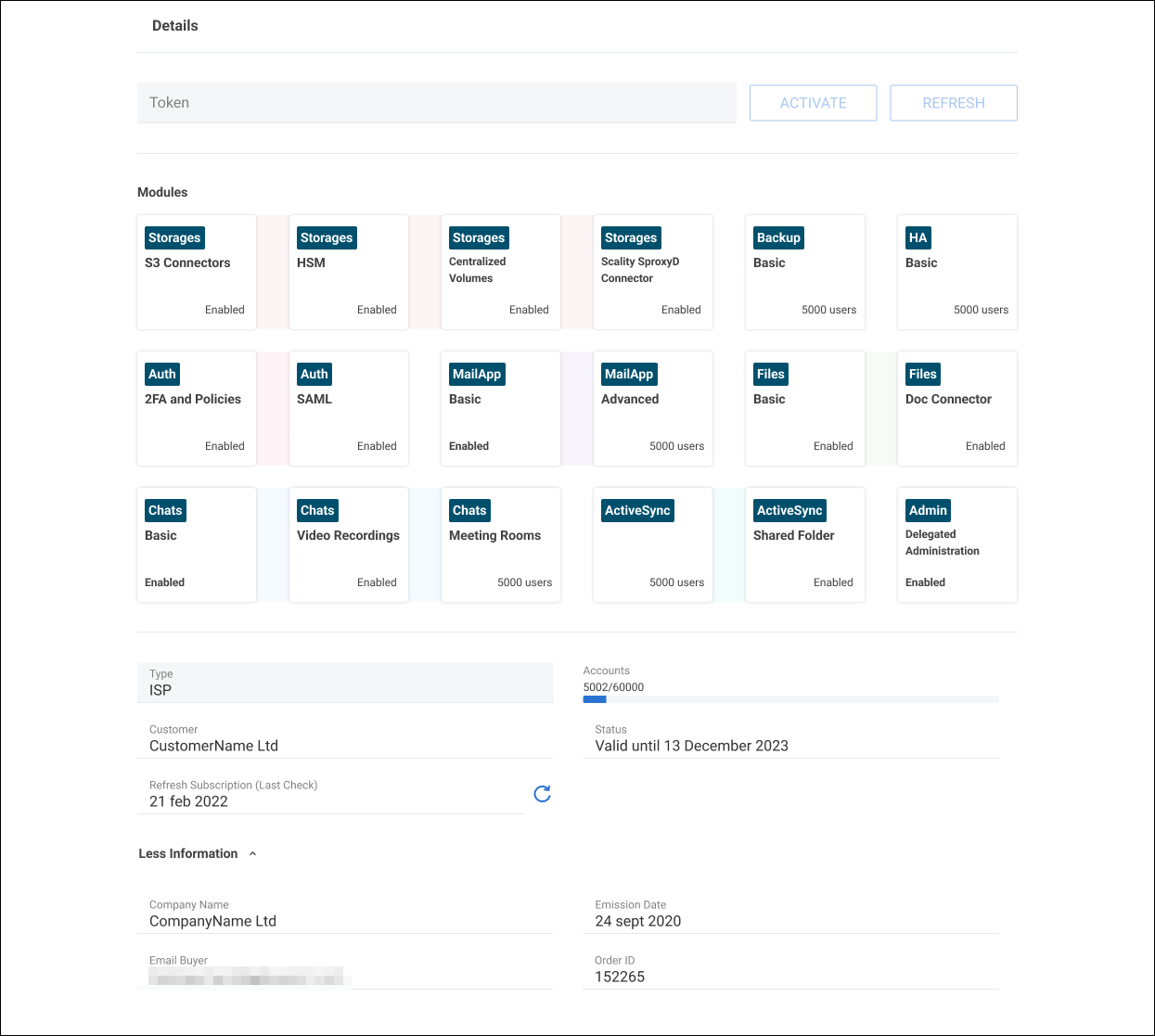
Fig. 11 Sample subscription page with enables services.#
Automatic License Renewal Behavior#
The license renewal process is handled automatically by a scheduled job (RenewLicenseJob), which periodically contacts the licensing API to renew the subscription.
In case of temporary backend issues (for example, HTTP 5xx errors), the renewal process is designed to tolerate transient failures and retry automatically, ensuring service continuity without administrator intervention.
The system distinguishes between transient errors (typically server-side issues) and permanent failures (such as invalid credentials). Transient errors do not prevent subsequent retry attempts, which are executed in the following scheduled cycles. This prevents the system from incorrectly considering a failed renewal as completed and reduces the risk of license expiration due to temporary outages of the licensing service.
If repeated failures occur or a non-recoverable error is detected, system administrators are notified and can still manually trigger the renewal process if needed.